Many ask:
“Can Adding More Pictures Increase SEO?”
The short answer: Yes… if done right.
Images do more than make a page look good. They can boost rankings, increase clicks, and drive traffic from Google Images.
But not all images help. Random screenshots or stock photos can slow your site and hurt rankings.
In this guide, you’ll learn how to use images to supercharge SEO without losing speed.
You’ll Learn:
- How visuals keep visitors on your page longer and reduce bounce rate.
- Compression, file names, alt text, lazy loading, and other must-dos.
- Why 3–5 relevant images outperform dozens of generic ones.
- How to get extra clicks from Google Image Search using structured data.
- Making sure your images look great and load fast on every device.
Let’s dive in.
1. Dwell Time: The Hidden SEO Supercharger
Google doesn’t just scan keywords. It measures user engagement, how long people stay, how deeply they interact, and whether they scroll or bounce. That’s where images win big.
When visuals are relevant and high‑quality, users stay longer. Longer sessions send a strong signal to search engines that your content solves the searcher’s problem. And that can lead to better rankings.
Impact you can measure:
- Pages with images receive 36% more clicks in search results.
- Users process visuals 60,000× faster than text, which speeds comprehension and keeps attention.
- Infographics and graphics can boost dwell time by 30–50%, compared to text-only content.
- Sites optimized for Google Images gain 12–18% more organic traffic via visual search referrals.
Why it works:
- Good visuals = faster understanding
- Faster understanding = deeper engagement
- Deeper engagement = stronger ranking signals
Images break up text, make content easier to digest, and reduce bounce rates. Posts with 3–5 images typically outperform text-only pages.
Pro Tips:
✔ Use a hero image above the fold to hook readers immediately.
✔ Add charts, screenshots, and infographics to simplify complex points.
✔ Use custom visuals over generic stock photos, they boost credibility and engagement.
Images aren’t just decoration. They’re an SEO supercharger, keeping users engaged, lowering bounce rate, and telling Google your page deserves a higher ranking.
2. Technical Optimization: The Non-Negotiables
Images can make or break SEO. Poorly optimized visuals slow your site, frustrate users, and tank rankings. In fact, images often make up 20–30% of a page’s total weight, so optimization is critical.
Here’s your technical checklist:
1. Compression is King
Large image files = slow pages. Slow pages = lower rankings.
- Aim for <100KB per image without losing quality.
- Tools like TinyPNG or ImageOptim can compress without visible loss.
- Pages that load in under 2 seconds see higher click-through and engagement.
2. Descriptive File Names
Never leave your image as IMG_001.jpg. Use keyword-rich titles like:
ergonomic-office-chair.jpg
This helps Google understand the image content and improves ranking potential.
3. Alt Text is Essential
Alt text improves SEO and accessibility.
- Describe the image clearly in 50–125 characters.
- Include your target keyword naturally, but don’t overstuff.
Example: Alt=”ergonomic office chair with adjustable lumbar support”
4. Lazy Loading
Images should load only when visible on screen.
- Keep your initial page load lightning-fast.
- Reduces bounce rates, especially on mobile.
- WordPress plugins like Smush or a3 Lazy Load make this easy.
5. Structured Data (Bonus)
Adding schema markup to images gives Google more context, increasing the chance to appear in rich results and Google Image search.
- Ideal for recipes, products, and tutorials.
- Can increase click-through rates by up to 15%.
Bottom line: Technical optimization is non-negotiable. Compressed, properly named, alt-tagged, and lazy-loaded images boost page speed, engagement, and SEO, all at once.
3. Quality Over Quantity: Fewer Images, Bigger Impact
How many images should you add to a page? There’s no magic number. But here’s the rule that works: 3–5 high-quality, relevant images spread naturally throughout the content.
More isn’t always better. In fact, too many irrelevant images can:
- Slow page speed
- Distract users
- Dilute SEO value
Here’s what works:
1. Skip Generic Stock Photos
Stock photos like people shaking hands or generic office scenes don’t build trust. They’re overused and don’t help dwell time or engage.
2. Use Original Visuals
Screenshots, custom graphics, and infographics perform significantly better. They:
- Convey authority
- Signal expertise to Google
- Keep users engaged longer
3. Charts & Diagrams
Complex ideas? Break them down visually.
- Charts and diagrams improve comprehension by up to 400% compared to text alone.
- They also show Google your content is comprehensive.
Pro Tips:
✔ Spread images evenly; beginning, middle, and end.
✔ Ensure each image adds value. If it doesn’t, remove it.
✔ Mix media types: combine screenshots, graphics, and diagrams to maintain attention.
Bottom line: One carefully chosen image beats ten irrelevant ones. Focus on quality and relevance, that’s how you boost engagement, dwell time, and SEO performance.
Want to improve your rankings even faster? Read more simple SEO tips to boost your website performance
4. Capture Traffic from Image Search: Untapped SEO Gold
Most businesses ignore Google Image Search, missing a huge source of organic traffic. Optimized images can drive 12–18% more visitors from visual search alone.
Why it matters:
- Users searching visually are highly engaged and often closer to conversion.
- Properly optimized images give you an extra entry point into Google’s ecosystem.
How to win:
1. Use Structured Data (Schema)
Structured data tells search engines exactly what your image represents.
- Helps images appear in rich results and featured snippets.
- Works especially well for recipes, products, tutorials, and infographics.
2. Optimize Image Metadata
- File name: Include keywords (best-vegan-recipes.png)
- Alt text: Describe clearly with context (Alt=”Vegan chocolate cake recipe with frosting”)
- Title tag: Optional, but can reinforce keywords
3. High-Quality, Relevant Visuals
Images must be clear, original, and useful. Google favors visuals that:
- Complement content
- Answer user intent
- Encourage shares and backlinks
4. Mobile-Friendly Images
With over 60% of searches on mobile, images must scale and load fast. Slow, unresponsive visuals can reduce clicks and engagement.
Pro Tips:
✔ Target both page content and image search traffic.
✔ Use infographics to summarize content, these often get shared and linked.
✔ Test image placement to maximize clicks from Google Images.
Bottom line: Google Image Search is a low-competition traffic source. Optimized visuals create a second pathway to attract highly engaged visitors.
Want to build stronger brand trust and authority? Read more about how content marketing strengthens brand authority
5. Mobile-First is the Only Way: Optimize Images for Every Screen
Over 60% of all web traffic comes from mobile devices. If your images don’t load fast or look good on small screens, your SEO will suffer.
Google uses mobile-first indexing, meaning it primarily evaluates the mobile version of your site for ranking. That makes mobile image optimization non-negotiable.
Key strategies:
1. Responsive Images
- Ensure images scale automatically on all screen sizes.
- Use CSS techniques like max-width: 100% to prevent overflow.
- Test on multiple devices, not all phones render the same.
2. Optimize for Page Speed
- Compress images under 100KB to avoid slow load times.
- Implement lazy loading so images load only when in view.
- Slow images reduce user engagement and can increase bounce rate by up to 32%.
3. Touch-Friendly Design
- Make buttons, sliders, and clickable images easy to tap.
- Avoid overlays that obscure visuals on small screens.
4. Test Mobile UX
- Use Google’s Mobile-Friendly Test to identify issues.
- Monitor Core Web Vitals: Largest Contentful Paint (LCP), First Input Delay (FID), and Cumulative Layout Shift (CLS). Images directly affect all three.
Pro Tips:
✔ Prioritize hero images and main visuals for mobile.
✔ Compress and lazy-load secondary images to save bandwidth.
✔ Use vector graphics (SVGs) when possible, they scale perfectly without losing quality.
Bottom line: Mobile-first isn’t optional. Fast, responsive, and touch-friendly images boost engagement, dwell time, and rankings.
Turn Images into an SEO Machine
Images aren’t just decoration. When used correctly, they boost rankings, increase engagement, and drive traffic from both search results and Google Image Search.
Here’s the key takeaway: Quality + Optimization + Mobile = SEO boost.
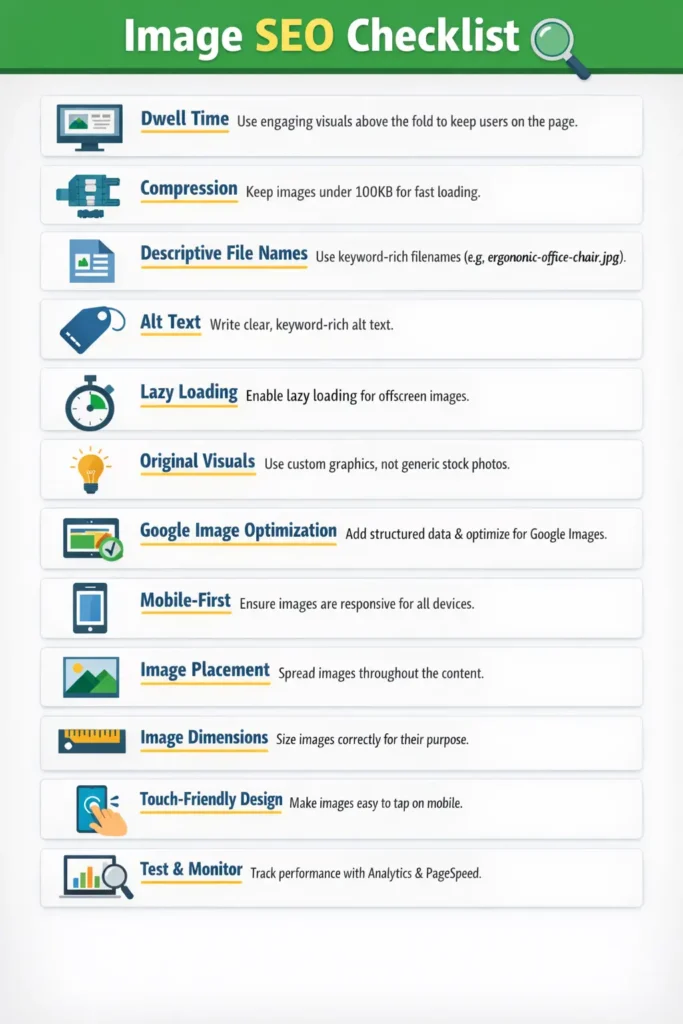
Your Image SEO Checklist
✔ Dwell Time – Use engaging visuals above the fold to keep users on your page.
✔ Compression – Keep images under 100KB without losing quality.
✔ Descriptive File Names – Use keyword-rich names like ergonomic-office-chair.jpg.
✔ Alt Text – Describe images clearly; include relevant keywords naturally.
✔ Lazy Loading – Load images only when users scroll to them.
✔ Original Visuals – Prioritize screenshots, charts, and infographics over generic stock photos.
✔ Google Image Search Optimization – Add structured data and target relevant keywords.
✔ Mobile-First – Ensure images are responsive, fast-loading, and touch-friendly.
Even 3–5 high-quality, optimized images per post can dramatically improve dwell time, reduce bounce rate, and increase organic traffic.
Follow these steps, and your visuals won’t just look good, they’ll actively help your SEO.